














sesh and Apollo are event-first bots: you post an event and members RSVP. Of the two, sesh fits a competitive team better, because its Time Finder lets members vote on a time. Apollo suits servers that run many community events. Neither bot's pages describe a role-aware lineup builder, so the captain picks the lineup. We build Supatimer, a free bot that shows which nights a full lineup can play and builds a lineup for every day and time slot. Its limits are one timezone per team and one-way Google Calendar sync with no iCal feed. It is also not built for community events.
Key takeaways
- Both bots start from an event that members RSVP to. sesh adds Time Finder, a vote on dates and times.
- sesh's strengths are per-user timezones, iCal feeds and, on Premium, two-way Google Calendar sync. Apollo's are unlimited free events and free signup presets. Both put waitlists on Premium.
- Neither sesh's nor Apollo's pages describe a role-aware lineup builder, so building the lineup is left to the captain.
- Supatimer starts from weekly availability: its board counts the free players for each time slot and turns the count green when a full lineup can play, and /weekplan builds a lineup for every day and time slot. It is free and supports 21 games, 10 of them with built-in role presets.
- sesh Premium costs $4.89 a month and Apollo Premium $6 a month, both billed annually, or $6.99 and $8 month to month. Supatimer costs nothing.
Our verdict: of the two, sesh for teams and Apollo for community events
sesh is the better pick for a competitive team, since Time Finder gives members a vote on a time. Apollo is built for servers with a busy calendar of community events. Both are built around events: you post one, and members RSVP to say whether they are coming. A competitive team's week starts from a different question: who is free on which nights, and whether those players cover every role.
A team that scrims four or five nights a week needs to see the whole week at once. In Overwatch, that means knowing which nights have five free players, and whether those five make up one Tank, two DPS and two Support, or three DPS and no Tank. With a recurring event, the captain gets a separate RSVP list for each night and has to merge them by hand.
We are the small team of developers and gamers behind Supatimer, a free team availability tracker for Discord that also builds lineups. That means we have a stake in this comparison.
One scrim week in four steps
A captain repeats four steps every week, and we checked sesh's and Apollo's pages against each one:
- Post the week. Put the schedule in the team's Discord channel, ideally without rebuilding it each Monday.
- Collect answers. Get every player to say when they can play, ideally without leaving Discord.
- See who is free. Read the answers as a week: which nights have a full lineup, and which are one player short.
- Pick a lineup. Turn the free players into a starting five or six that covers the roles, plus subs.
Scrims are often booked the same day, so step 3 has to be quick. Picture a captain's typical Friday: an opponent offers a scrim at 8 tonight or at 9 tomorrow. The captain opens both nights' events and reads each RSVP list to check for a Tank, two DPS and two Support. Matching roles across two lists is slow, and before the captain has an answer, the opponent may have booked someone else.
sesh and Apollo handle steps 1 and 2 well, though repeating every scrim event each week needs Premium on both. Steps 3 and 4 are where sesh, Apollo and Supatimer differ most.
Running the week in sesh
In sesh, Time Finder helps the team agree on a time, and the lineup is left to the captain. Everything we say about sesh below comes from its manual and Premium page, as we read them on November 17, 2026.
Step 1, post the week. You create events with /create or on the web. Recurring events are Premium, so on the free tier you create each scrim event again every week.
Step 2, collect answers. Members RSVP to each event. On Premium, custom RSVP options add waitlists with attendance limits, so you can cap a scrim at five or six players and put the rest on the waitlist.
Step 3, see who is free. You read each event's RSVP list, or run a Time Finder vote, which is in beta and free. Members vote on dates and times in Discord or on the web, and you can create an event from the winning time. Premium adds anonymous voting, hidden results and voting limited by server role.
Step 4, pick a lineup. sesh's pages describe no role-aware lineup builder, so the captain picks the lineup by hand.
Beyond the four steps, sesh does well on timezones and calendars. Every viewer sees event times in their own local time, and /link gives an iCal feed. On the free tier, each user can set up one outbound Google Calendar sync per server, and Premium adds two-way sync.
Running the week in Apollo
In Apollo, the week is a set of events, each with its own RSVP list. Everything we say about Apollo below comes from its Premium page and its Premium memberships page, as we read them on November 17, 2026.
Step 1, post the week. Free servers get unlimited events but only one active recurring event, and unlimited recurring events are Premium. If your team has four different weekly scrim events, one can recur and you create the other three again each week.
Step 2, collect answers. Signup presets are free, and custom signup options are Premium. Apollo's Premium page lists waitlists and limited-capacity events among its Premium features. Limited-capacity events let you cap a scrim at five or six players, and waitlists hold the rest.
Step 3, see who is free. You read the week by opening each event's RSVP list. The two pages list no availability vote or weekly board.
Step 4, pick a lineup. The captain builds it from the RSVP lists.
For calendars, free servers get manual Google Calendar sync, and Premium makes it automatic.
Side by side: features and prices for a scrim week
The biggest difference is that Supatimer shows which nights a full lineup can play. The sesh and Apollo pages we read describe nothing like it. Supatimer's /weekplan also builds a lineup for every day and time slot, for free. Not described means the pages we read do not mention the feature.
Features
| Feature | sesh | Apollo | Supatimer |
|---|---|---|---|
| Posting each week | Recurring events on Premium only | One active recurring event free, unlimited on Premium | /avail each week; channel, ping roles and time slots carry over; free |
| Events, signups and waitlists | Events with RSVPs free; waitlists on Premium | Unlimited events and signup presets free; waitlists on Premium | A weekly board, not events |
| Availability vote or board | Time Finder (beta), free; extras on Premium | Not described | Weekly board in Discord, plus free scheduling polls |
| Calendar sync | iCal feeds; Google: one outbound sync per user per server free, two-way on Premium | Google: manual free, automatic on Premium | One-way Google sync of confirmed scrims; no iCal feed |
| Role-aware lineup building | Not described | Not described | /weekplan builds a lineup for every day and time slot, free |
| Scrim-ready check | Not described | Not described | Yes: the count of free players turns green when a full lineup can play |
Prices
sesh's cheapest Premium plan is $4.89 a month on annual billing, Apollo's is $6, and Supatimer has no paid plan. Prices are per month on annual billing unless they say month to month.
| Bot | Free | Premium plans |
|---|---|---|
| sesh | Yes | Premium $4.89/month, or $6.99 month to month (one server); Premium Bundle $8.99/month, or $12.99 month to month (three servers); sesh Pro $16.67/month, or $24.99 month to month (one server) |
| Apollo | Yes | Premium $6/month ($72/year), or $8 month to month; Premium Pro $20/month ($240/year), or $25 month to month |
| Supatimer | Yes | None |
Apollo Premium is bought per server, and everyone in that server gets it.
Supatimer runs on donations, and our Open finances page shows what it costs each month.
How Supatimer runs the same week
Supatimer starts the week from availability: players say when they are free, and the bot works out which lineups are possible.
Step 1, post the week. /avail posts the weekly availability board in your team's Discord channel. You run that one command each week, and the channel, ping roles and time slots carry over. Each day holds up to five time slots, such as warmup, early scrims and late scrims.
Step 2, collect answers. Players use the board's buttons to mark when they can play, or a drop-down menu when the team has a single time slot. A team can turn on a maybe answer for players who are not sure.
Step 3, see who is free. The board counts the free players for each day and time slot. Every team with two or more time slots, or with a maybe answer, gets these counts. A team with one time slot and no maybe answer starts on a plain list of names, and can switch to the counts, called Heatmap, in its calendar settings. The scrim-ready check turns a count green when a full lineup can play, with every role filled in the games that have role presets. A yellow corner on a green count means a full lineup can play only if the players who answered maybe show up. The board updates as players answer, and our Discord availability bot page shows it in full.
Back to the Friday offer of a scrim at 8 tonight or at 9 tomorrow. The players marked the whole week on one board, so the captain looks at the two counts that cover those times instead of reading two RSVP lists. If one is green, a full lineup can play then, and the captain says yes before the opponent books someone else.
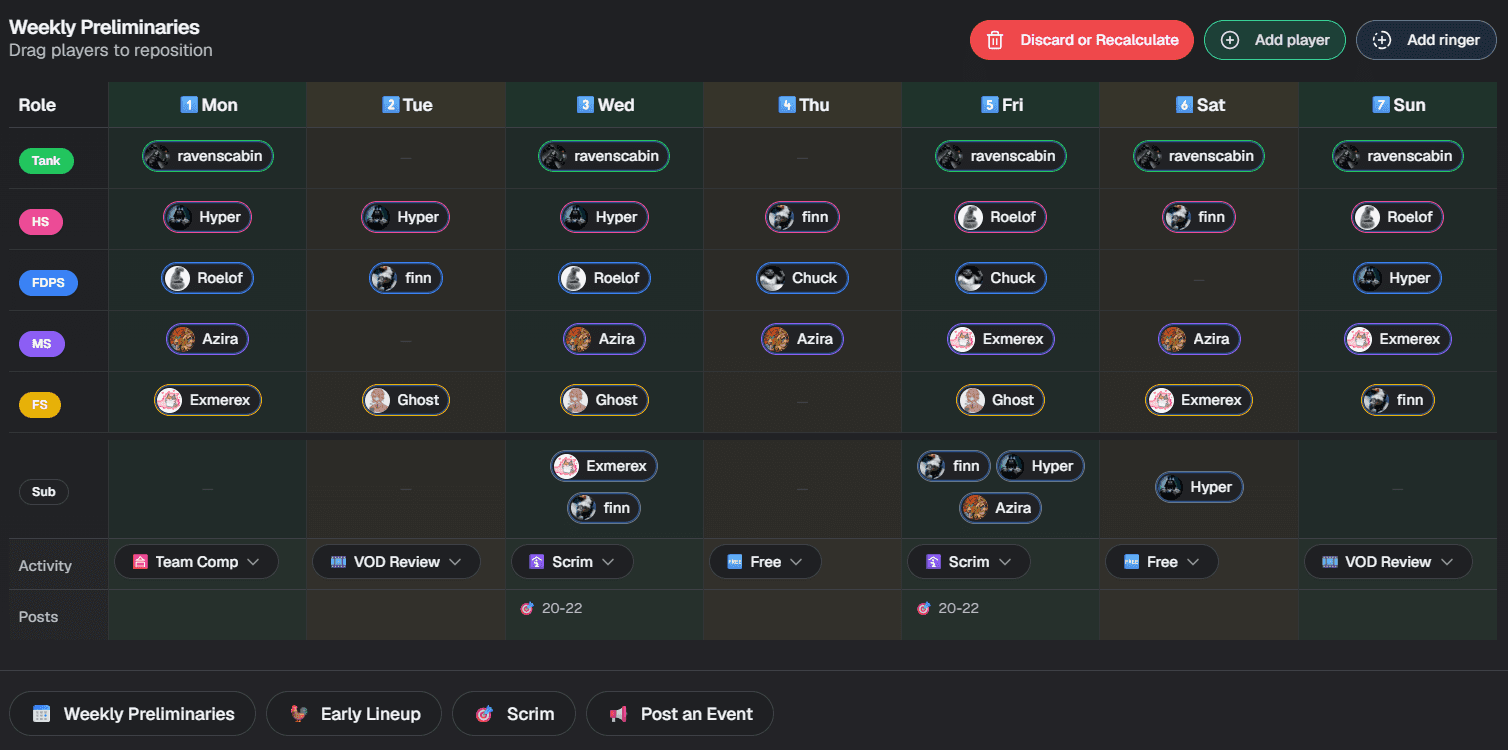
Step 4, pick a lineup. A team manager, usually the captain, runs /weekplan. It builds the week's lineups, one for every day and time slot, and posts them in the team's channel. It fills each role in roster order: mains first, then tryouts, subs and ringers. For Overwatch it also uses players who can flex and favors each player's primary role. Once a scrim is booked, the captain runs /scrim to confirm it and post the match announcement.
Supatimer supports 21 games. Of those, 10 have built-in role presets that /weekplan fills role by role, including Overwatch, Valorant, Counter-Strike 2, Marvel Rivals and League of Legends. In the other 11, such as Apex Legends and Rocket League, /weekplan fills the team's seats from whoever is free.
Setup happens once: a server admin adds the team in the dashboard and sets each player's roles on the team's roster. The User Guide covers the dashboard, and the command reference lists every command.
Supatimer's limits next to sesh and Apollo
Supatimer trails sesh on timezones and calendars, and it trails both bots on community events. If one of these matters more to you than lineups, pick the bot that handles it better.
- Supatimer runs each team on one timezone, and the times on the board's buttons are in that zone. A team can turn on its Discord Timestamps setting to add a line to the board that shows those times in each viewer's local time. sesh shows every event in each viewer's local time.
- Google Calendar sync is one way, and there is no iCal feed. Each player who connects their Google account gets their confirmed scrims in a separate Supatimer calendar there, and nothing is read back from Google.
- sesh and Apollo are built around events, so they fit community events better.
Which bot to pick for your team
If you are choosing between sesh and Apollo only, pick sesh for its Time Finder vote. Supatimer has a free scheduling poll as well, so the vote is no reason to pick sesh over Supatimer. Pick sesh over Supatimer if your roster spans timezones, if you want an iCal feed, or if you will pay for two-way Google Calendar sync on Premium. Pick Apollo if your server runs many community events, since free servers get unlimited events.
You can also run two bots: sesh or Apollo for community events, and Supatimer for the team's scrim week. They do different jobs and do not conflict. For more bots, see our roundup of Discord scheduling bots.
Pick Supatimer if your bottleneck is knowing which nights a full lineup can play, because its board shows that as a green count. To start, a server admin adds Supatimer with the Add Supatimer to Discord button below, then adds the team and its players' roles in the dashboard. Then the captain runs /avail to post next week's board.
Frequently asked questions
Is sesh or Apollo better for a competitive gaming team?
sesh. Its Time Finder beta gives members a vote on dates and times, and the Apollo pages we read list no such vote. Apollo is the better pick for servers that run many community events, since free servers get unlimited events.
How much do sesh Premium and Apollo Premium cost?
As we read sesh's and Apollo's pricing pages on November 17, 2026, sesh Premium for one server is $4.89/month billed annually, or $6.99 month to month. Apollo Premium is $6/month billed annually ($72/year), or $8 month to month, and is bought per server.
What does Supatimer cost?
Nothing, and it has no ads. Donations pay for it, and our Open finances page at supatimer.com/transparency lists what it costs to run each month.
How does Supatimer decide who plays when more players are free than there are seats?
Roster order decides: available mains get seats before tryouts, and tryouts before subs and ringers. In Overwatch, flex players also fill gaps, and players get their primary role where possible.
Can I run Supatimer alongside sesh or Apollo?
Yes. An event bot can run community events while Supatimer runs the team's scrim week.
Does Supatimer support per-user timezones?
Partly. Each team runs on one timezone, and the times on the board's buttons are in the team's zone. The team's Discord Timestamps setting adds a line to the board that shows those times in each viewer's local time.